
- Centralized Management: Supports up to 100 Omada access points, 10 Omada routers, a maximum of 20 Omada switches, and a maximum of 2 certain DeltaStream GPON OLTs†
- Free Cloud Access: Manage and monitor with the Omada app or Web UI from anywhere, anytime.
- On-Premises Management: Locally monitor and manage devices with the ultimate security and stability.
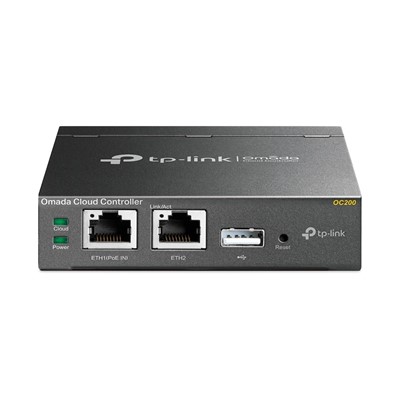
- Industry-Leading Hardware Design: A powerful chipset, durable metal casing, USB 2.0 port for auto backup, and two Fast Ethernet ports.
- Flexible Power Supply: 802.3af/at PoE or Micro USB (DC 5V/Minimum 1A) for flexible installation.
- Easy and Intelligent Network Monitoring: The easy-to-use dashboard makes it simple to see the real-time network status and traffic distribution.
- Real-Time Network Topology: Helps IT admins quickly see and troubleshoot connections at a glance.
- Easier Network Maintenance: WiFi heatmap simulator, visualizable network report, and batch & multi-site management benefit network maintenance.
A Professional Omada SDN Controller with No Need to Run a PC/Server
Centralized Management for Access Points, Switches, and Routers
OC200, the professional on-premises hardware controller for the Omada Software Defined Networking (SDN) platform, provides 100% centralized management of Omada access points, Omada switches, and Omada routers—all controlled from a single interface.
Hybrid Cloud for Maximum Convenience
Featuring hybrid cloud technology, the Omada Hardware Controller OC200 allows you to remotely control the whole network wherever you are in the world with cloud access. Locally manage devices with the ultimate security and stability.
Industry-Leading Hardware Design
Equipped with an advanced design and the latest chipset, OC200 has enough processing power to support the massive management of your business network.
Easy and Intelligent Network Monitoring
The easy-to-use dashboard makes it easy to see your real-time network status; check network usage and traffic distribution; receive network condition logs, abnormal event warnings, and notifications; or even track key data for better business results. Network topology helps IT admins quickly see and troubleshoot connections at a glance.
Multiple Factors Guarantee Easier Network Maintenance
WiFi Heatmap Simulator
Generate a Wi-Fi solution by simulating the wireless coverage effect of APs in the actual site. Determine the appropriate number and location of APs according to the coverage requirements.
Visualizable Network Report for Conveniently Summary
Help service providers easily report network service quality to their customers through reports. IT administrators also easily report network operation status through reports.
- HARDWARE FEATURES
- Interface • 2× 10/100 Mbps Ethernet Port
- • 1× USB 2.0 Port
- • 1× Micro USB Port
- Power Supply 802.3af/at PoE or Micro USB(DC 5V/Minimum 1A)
- Dimensions ( W x D x H ) 3.9×3.9×1.0 in (100×98×25 mm)
- Management Features
- Omada App Yes
- Centralized Management • 100 Omada access points
- • 10 Omada routers
- • A maximum of 20 Omada switches†
- • A maximum of 2 certain DeltaStream GPON OLTs†
- Note: Please refer to www.tp-link.com/en/business-networking/all-omada/ to find all the Omada device models supported by OC200
- †The number of supported Omada switches decreases by 5 for each DeltaStream GPON OLT added. Refer to https://www.omadanetworks.com/omada-sdn/product-list/#sp-gpon to find all the DeltaStream GPON OLTs that are supported by the controller.
- Cloud Access Yes
- L3 Management Yes
- Multi-site Management Yes
- Management Features • Automatic Device Discovery
- • Batch Configuration
- • Batch Firmware Upgrading
- • Intelligent Network Monitoring
- • Abnormal Event Warnings
- • Unified Configuration
- • Reboot Schedule
- • Captive Portal Configuration
- OTHERS
- Certification CE, FCC, RoHS
- Package Content • Omada Hardware Controller OC200
- • Quick Installation Guide
- • Ethernet Cable
- System Requirements Microsoft® Windows®10, 8, 7,Vista™, XP or MAC® OS, NetWare®, UNIX® or Linux
- Environment • Operating Temperature: 0–40 (32–104 )
- • Storage Temperature: -40–70 (-40–158 )
- • Operating Humidity: 10–90% RH non-condensing
- • Storage Humidity: 5–90% RH non-condensing